Check the Audit Trail first
From Requests, open the request and check its Audit Trail. It shows whether each reminder or notification email was delivered, bounced, or reported as spam.
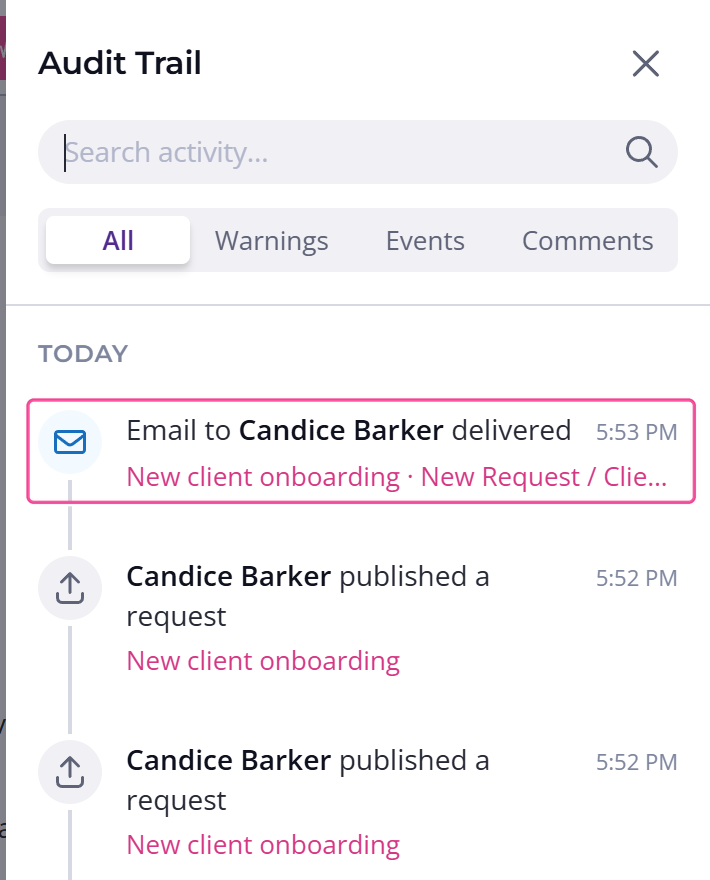
The row may not appear straight away after you send, so check back if it isn't there yet.
The Audit Trail covers reminder and notification emails. For a missing sign-in code email, go straight to the spam and sending-domain checks below.
The email went to spam
Most often, the client's email provider is filtering the message into spam or blocking it before it reaches the inbox. Ask your client to:
- Look in their spam or junk folder
- Search there for emails from Content Snare
- Mark anything they find as Not Spam, so future emails land in the inbox
By default emails come from contentsnare-mail.com and show under your company's name. If the client's organization filters email strictly, their IT team may need to allow that domain, or your own sending domain if you have verified one. For more, see where your client's emails come from.
The client's address bounced
If an email hard bounces, meaning the client's mail server reports the address as invalid or won't accept mail, Content Snare's email provider stops sending to that address. This protects delivery for everyone, since repeatedly sending to a dead address can get all your emails blocked.
The address goes on a suppression list. If you're sure the address is correct, email support at support@contentsnare.com and they'll remove it from the list so emails start sending again. The Audit Trail will show a bounce row if this is what happened.
Messaging was turned off at publish
If your client got nothing at all, not even the first email, check whether you turned off messaging when you published the request. Choosing "Don't send any messages to my client" stops the first request email and every reminder email and SMS on that request.
If it's selected, either switch the request to a schedule that sends messages, or send your client the link yourself.
No reminders after the first email
If the first email arrived but the follow-ups didn't, the request is on a schedule that doesn't send reminders. The built-in "No automatic reminders" schedule sends the first request email but no reminder emails after it. Switch the request to a schedule that includes reminders and Content Snare will chase them for you.