To reuse a page or section in another request, save it as a template, then add that template into the request you want it in. This works whether you start from a live request or from a template.
Save the page or section as a template
- Open Requests.
- Choose Edit on the request or template that has the page or section you want to reuse.
- Find the page or section in the left sidebar.
- Click the three-dot menu next to it and choose:
- Create page template to save the whole page.
- Create section template to save only that section.
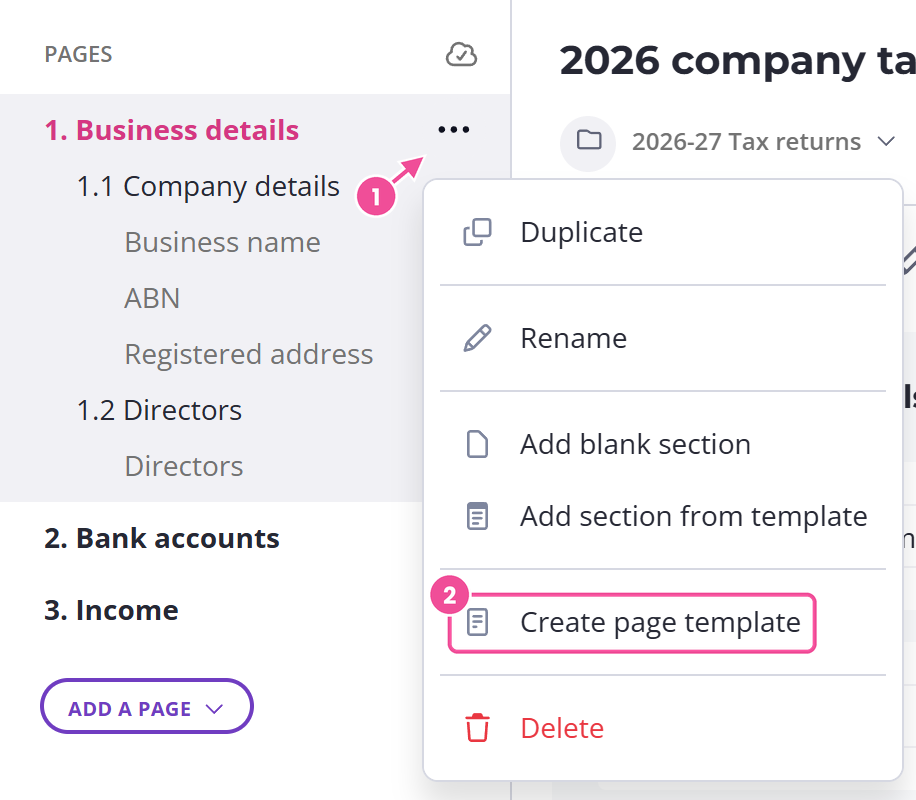
Either one saves it to your template library, ready to drop into any request.
Add the saved page or section to the other request
Go back to Requests and choose Edit on the request that needs the page or section.
To reuse a whole page, click Add a page and pick From template. To reuse a section, click Add a section and pick From template. Then choose the template you saved, and Content Snare inserts it into the request.
Check any conditions you set up
Saving a page or section keeps the conditions set up inside it. It leaves out any condition that relies on an answer somewhere else in the request. So if a question only appeared after a client answered something on another page, that setup won't be there in the new request. Open the reused page or section, check it, and set up any missing conditions again.