A condition controls whether a client sees a particular question, based on how they answer another one. Set one up and each client only works through the questions that apply to them, instead of reading past the ones that don't.
For example, put "Do you have any rental properties?" near the start of a request. Clients who answer yes get the rental property questions that follow; everyone else never sees them.
Set up a condition
- Open Requests.
- Choose Edit on the request or template you want to change.
- Select the question you want to control.
- Turn on Conditions in its options.
A dropdown appears set to Show, which reveals the question when your rule is met. Switch it to Hide to take the question away when the rule is met.
Then choose Add a condition and build the rule: the page the trigger question sits on, the question itself, the test to run, and the value to compare against. The tests you can pick from are Equals, Does not equal, Contains, Is empty, Has a value, Greater than, Less than and Field has been submitted.
To hide the rental property questions from clients who don't have any, set the rule to:
- Set the field to "Do you have any rental properties?"
- Set the test to Equals.
- Set the value to Yes.
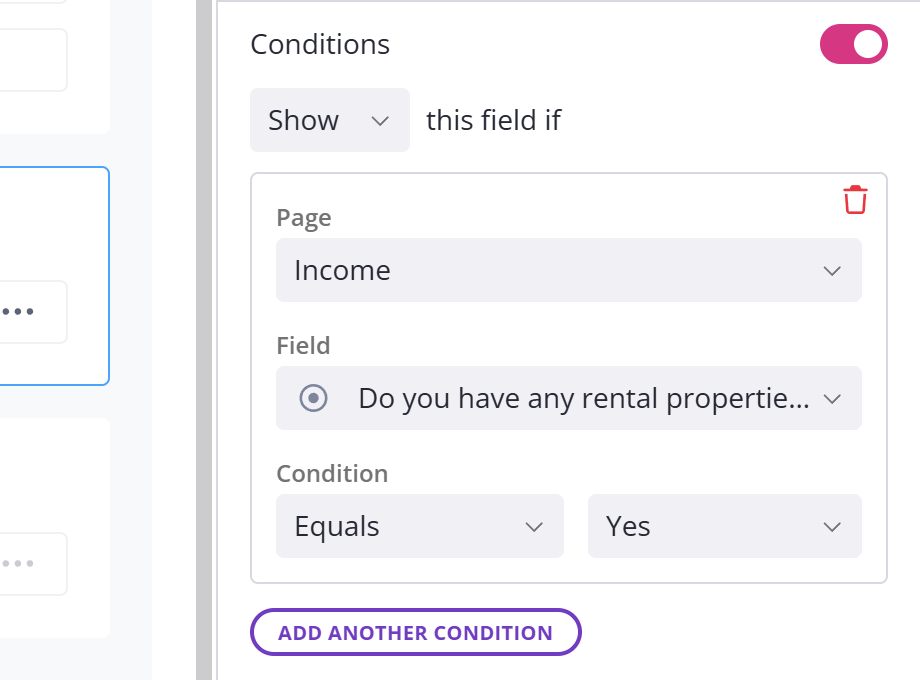
Now the rental property questions show only for clients who pick Yes. If the page has many questions, type in the question selector to filter the list.
Testing a table column
On a table question you also pick which column is used in the condition. The test then looks down every row of that column, so on a table the tests are named for how many rows have to match.
| The usual test | On a table column | Passes when |
|---|---|---|
| Contains | A cell contains | at least one row contains the value |
| Equals | A cell equals | at least one row equals the value |
| Has a value | Any cell has a value | at least one row is filled in |
| Does not equal | All cells do not equal | no row equals the value |
| Is empty | All cells are empty | every row is empty |
Scroll sideways to see the whole table
So on a ten-row table, A cell equals fires as soon as one row matches, while All cells do not equal only fires when none of them does.
The tests you're offered depend on the type of column. Contains only appears for text columns and for dropdowns that allow more than one choice. A file column only offers All cells are empty and Any cell has a value. Field has been submitted isn't offered on a table column at all.
Greater than and Less than only appear for number, currency, date and date range columns. On a date column they're called After date and Before date. On a date range column they compare how many days the range covers. All four only pass when every filled-in row passes, and at least one row has to be filled in.
Combine more than one condition
Add a second rule to the same question with Add another condition. Once there is more than one, a match dropdown appears. Set it to All if every rule must be true, or Any if one is enough.
Base a condition on an earlier page
The page dropdown in a rule is not limited to the page you are editing. Point it at an earlier page and an answer given there controls a question much later in the request.
Hide a whole page or section
A page or section has the same Conditions toggle as a single question, so one rule can hide an entire page. When a client says they have no rental properties, hide the rental properties page rather than switching off each question on it one by one.
Use an internal field as the trigger
You can use an internal field as the trigger for a condition, the same as a client's answer. Your team fills these in and clients never see them, so you can answer a setup question yourself, such as how many entities a client has, and only the relevant questions show when the client opens it. This is a good way to use one template across different clients. See internal fields for how they work.
Keep each condition to one kind of field, though. Mix an internal field with a regular one in the same rule and the builder warns you it can behave unpredictably.
See what other questions an answer affects
As soon as a question is used as a trigger, the builder adds an Affects visibility of list to it, naming every question, section and page that depends on that answer. Read it before you change or delete the question, so nothing disappears by surprise. Delete a trigger question and the conditions built on it go too, and the builder tells you before it does.
Required questions behind a condition
A hidden question doesn't have to be answered, even if you marked it required. So you can mark conditional questions required without worrying that a client will be stuck on one they never see.