Is an embedded request a public form?
No. An embedded request is a single shared request shown inside a frame on your page, not a fresh form for each visitor. Everyone who opens it sees the same answers, so if two people land on the same embedded request they can read and change what the other typed.
Embed a request only where one client can reach it, such as a page behind that client's own login.
If what you want is a public form anyone can fill out fresh, set up a website form that creates a request instead.
Turn on embedding
Embedding is off by default, and an Administrator turns it on.
- Click your avatar in the top right and choose Settings.
- Go to Company, then Requests.
- Under Embedding, turn on Allow requests to be embedded on websites.
Next to that, Allow embedding on these domains sets which sites can load your requests. Add the domains you'll embed on as a comma-separated list, using the domain name only, like "domain.com". Leave it empty and any website can embed your requests.
Copy the embed code
You'll only see the embed code once the request is published, and only Administrators can see it.
- Open Requests and open the published request you want to embed.
- Go to the publish step.
- Copy Embed Code, or the code for the client you want under Embed Codes when the request goes to several people.
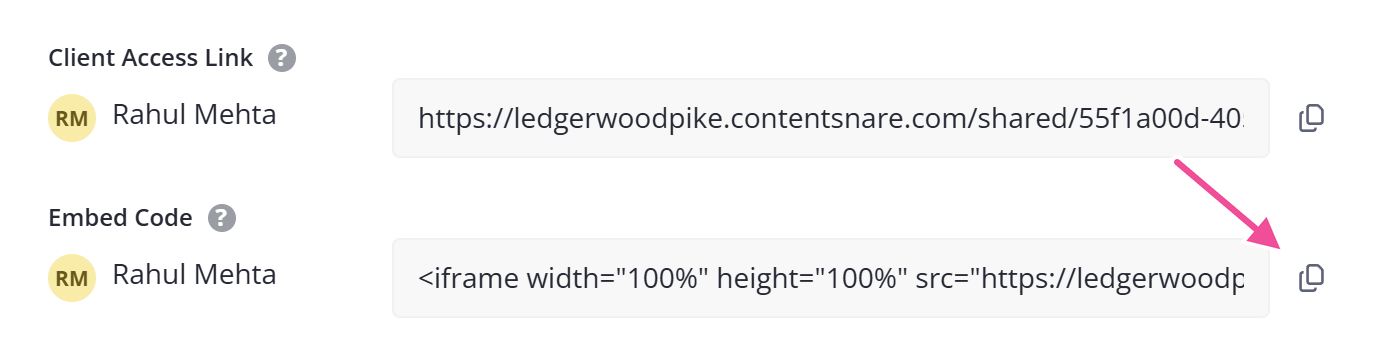
Paste it into your page.
If you already pull share links through webhooks or Zapier, you can construct the code and inject it into your portal automatically. The embed code is an iframe with the share link as the source: <iframe src="YOUR_SHARE_LINK"></iframe>.
Keep the embedded page secure
The embedded frame loads the request's share link, and that link has no login. Anyone who can open the page can open the request, so put the page behind your own access control, such as the login your clients already use for your portal.